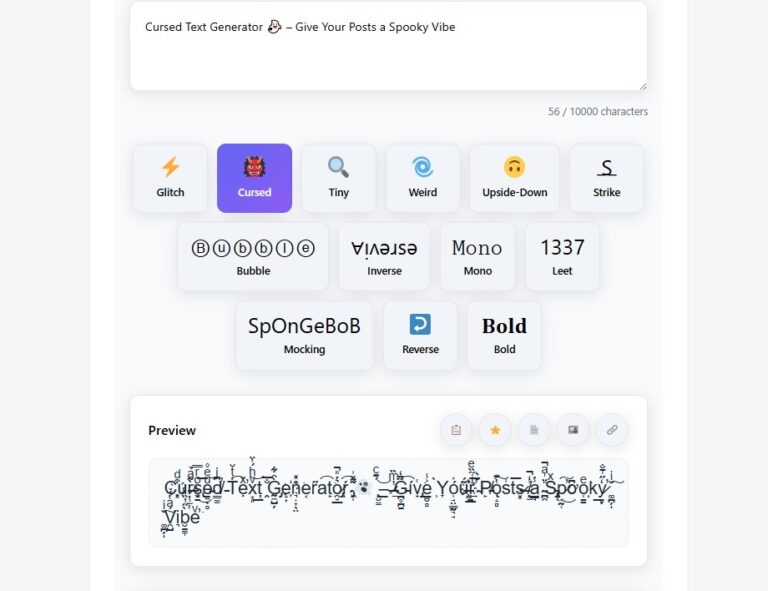
Cursed Text Generator 👻 – Give Your Posts a Spooky Vibe
Use our free cursed text generator to create spooky, eerie text for social posts, bios & horror themes. Easy, fast, and mobile-friendly — try
Ad Space 1 (Google AdSense)
Ultimate Text Generator Pro
Create stunning text effects including glitch, cursed, tiny, upside-down, bold, wavy, greek, curved, and groovy text styles for social media, gaming, and messaging.
Ad Space 2 (Google AdSense)
Ad Space 3 (Google AdSense)
Process multiple lines of text at once. Each line will be transformed separately.
Create custom text replacement rules. Each rule will be applied in order.
Your recent transformations. Click to apply again.
Your favorite transformations. Click to apply again.
Ad Space 4 (Google AdSense)
Popular Text Effects Explained
Glitch Text Generator
Our glitch text generator creates distorted, digital-style text that looks corrupted or glitched. Perfect for gaming usernames, social media bios, or creating a futuristic aesthetic.
Cursed Text Generator
Also known as Zalgo text, cursed text adds multiple diacritical marks to characters, creating a creepy, corrupted appearance. Control the intensity and placement of these marks.
Tiny Text Generator
Create small Unicode text perfect for Instagram bios, Twitter handles, or when you need to fit more text in limited space. Offers both "tiny" and "micro" presets.
Weird Text Generator
Applies various effects like alternate letter spacing, intermittent capitalization, and swapped characters to create unique, attention-grabbing text.
Wavy Text Generator
Create text with a wavy, flowing effect using our wavy text generator. Perfect for creating artistic text that appears to float or move in waves.
Greek Font Generator
Transform your text into Greek characters with our Greek font generator. Ideal for creating mathematical notation, fraternity/sorority names, or classical text.
Curved Text Generator
Create text that appears to curve or bend with our curved text generator. Perfect for logos, headers, or when you want text to follow a circular path.
Groovy Text Generator
Add a retro, psychedelic feel to your text with our groovy text generator. Perfect for 70s-inspired designs, music festival promotions, or funky text.
Frequently Asked Questions
Simply type or paste your text into the input box, then click on the 'Glitch Text' button. Adjust the intensity using the slider to control how glitchy the text appears.
Yes! All the text styles generated by our tool use Unicode characters, which are supported by most social media platforms including Instagram, Twitter, TikTok, and Facebook.
Cursed text, also known as Zalgo text, is created by adding multiple combining diacritical marks to regular characters. This makes the text appear corrupted, creepy, or 'cursed'.
To create wavy text, type or paste your text into the input box and click the 'Wavy' button. Our tool will apply a wave effect to your text, making it appear to flow in waves.
Yes, our text generator is completely safe to use. All transformations happen in your browser - no data is sent to our servers. We also include a 'safe mode' that limits combining characters.
Estimated Reading Time: ~ 12–14 minutes
Table of Contents
- Introduction
- Problem Context: Why Normal Text Can’t Scare or Surprise
- Solution Overview: What a Cursed Text Generator Does
- How to Use the Cursed Text Generator — Step-by-Step
- Benefits & Real-World Examples
- Design & Technical Tips: Make It Render Right Everywhere
- Safety, Etiquette & Platform Rules (When to Use — and When Not To)
- Advanced Use Cases: Marketing, Horror Events, Social Experiments
- Quick Troubleshooting (Common Issues & Fixes)
- FAQ (Schema ready)
- Conclusion
Introduction
Use
Ad Space 1 (Google AdSense)
Ultimate Text Generator Pro
Create stunning text effects including glitch, cursed, tiny, upside-down, bold, wavy, greek, curved, and groovy text styles for social media, gaming, and messaging.
Ad Space 2 (Google AdSense)
Ad Space 3 (Google AdSense)
Process multiple lines of text at once. Each line will be transformed separately.
Create custom text replacement rules. Each rule will be applied in order.
Your recent transformations. Click to apply again.
Your favorite transformations. Click to apply again.
Ad Space 4 (Google AdSense)
Popular Text Effects Explained
Glitch Text Generator
Our glitch text generator creates distorted, digital-style text that looks corrupted or glitched. Perfect for gaming usernames, social media bios, or creating a futuristic aesthetic.
Cursed Text Generator
Also known as Zalgo text, cursed text adds multiple diacritical marks to characters, creating a creepy, corrupted appearance. Control the intensity and placement of these marks.
Tiny Text Generator
Create small Unicode text perfect for Instagram bios, Twitter handles, or when you need to fit more text in limited space. Offers both "tiny" and "micro" presets.
Weird Text Generator
Applies various effects like alternate letter spacing, intermittent capitalization, and swapped characters to create unique, attention-grabbing text.
Wavy Text Generator
Create text with a wavy, flowing effect using our wavy text generator. Perfect for creating artistic text that appears to float or move in waves.
Greek Font Generator
Transform your text into Greek characters with our Greek font generator. Ideal for creating mathematical notation, fraternity/sorority names, or classical text.
Curved Text Generator
Create text that appears to curve or bend with our curved text generator. Perfect for logos, headers, or when you want text to follow a circular path.
Groovy Text Generator
Add a retro, psychedelic feel to your text with our groovy text generator. Perfect for 70s-inspired designs, music festival promotions, or funky text.
Frequently Asked Questions
Simply type or paste your text into the input box, then click on the 'Glitch Text' button. Adjust the intensity using the slider to control how glitchy the text appears.
Yes! All the text styles generated by our tool use Unicode characters, which are supported by most social media platforms including Instagram, Twitter, TikTok, and Facebook.
Cursed text, also known as Zalgo text, is created by adding multiple combining diacritical marks to regular characters. This makes the text appear corrupted, creepy, or 'cursed'.
To create wavy text, type or paste your text into the input box and click the 'Wavy' button. Our tool will apply a wave effect to your text, making it appear to flow in waves.
Yes, our text generator is completely safe to use. All transformations happen in your browser - no data is sent to our servers. We also include a 'safe mode' that limits combining characters.
👉 Try the Cursed Text Generator now: https://wikipediasearch.com/text-generator/ (opens in a new tab)
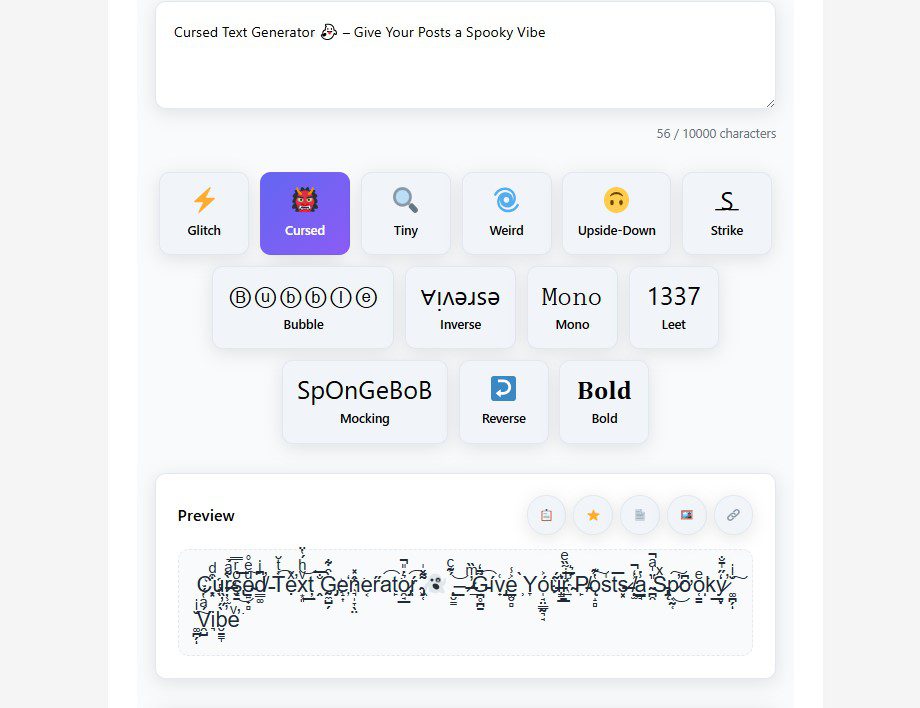
Problem Context — Why Normal Text Can’t Scare or Surprise
Regular text is predictable. People scroll fast, and plain copy rarely stops thumbs. If you want to create emotional reactions—creepiness, curiosity, or a sense of unease—you need more than words: you need style, timing, and surprise. That’s where stylized unicode text—what many call “cursed text”—comes in.
Common issues people face without a dedicated tool:
- Manual use of special characters is slow and inconsistent.
- Many “fancy text” tools offer pretty fonts, but not unsettling or creepy effects.
- Some generators produce characters that don’t render well on mobile or on certain platforms.
- Overuse of weird characters can trigger platform filters or make text unreadable.
If your goal is to add a spooky twist to an event promo, horror story, or Halloween post, you need a reliable, simple way to create cursed text that balances readability with creep factor.
Solution Overview — What a Cursed Text Generator Does
A dedicated cursed text generator converts your plain text into a series of Unicode characters and diacritics that look “wrong” or disturbing—think overlapping marks, reversed elements, or characters that seem to glitch. The generator handles the heavy lifting: assembling compatible character combinations, preserving readability where possible, and letting you preview output.
Key features you should expect from a great cursed text generator:
- Multiple spooky styles (subtle creep to full-on cursed).
- Copy to clipboard button for quick use.
- Cross-platform compatibility checking (mobile & desktop).
- No signup, lightweight, and fast.
- Example outputs and use cases to inspire you.
Our tool at WikipediaSearch provides the above—plus the option to pair your cursed name or line with design elements (consider the Random Color Palette Generator for eerie color schemes, or the CSS Gradient Generator for haunted headers).
Internal resources you might want:
- Pick a spooky color scheme with the Random Color Palette Generator.
- Create an eerie gradient background using our CSS Gradient Generator.
How to Use the Cursed Text Generator — Step-by-Step
This section gives a clear, copy-and-paste workflow so you can create cursed text fast.
- Open the tool page — go to https://wikipediasearch.com/text-generator/ (opens in a new tab).
- Type your base text — short phrases work best (e.g., “Enter if you dare”, “Haunted Night”, “Sleep tight”).
- Choose the “Cursed / Creepy” style from the style selector. Some tools label it “Cursed”, “Creepy”, or “Weird”.
- Preview the output in the result area. Look for rendering issues—some letters might appear as squares on very old devices.
- Copy the produced text with the Copy button or select + copy manually.
- Paste to your destination—Instagram caption, Discord name, Twitter bio, story overlay, or even printed materials.
- Test the result on mobile and desktop (send a test message to a friend or post to a private group to confirm appearance).
Screenshot placeholder: Show tool input “Enter if you dare” on left; show cursed output on the right (1200×628px).
CTA: Try it now and paste into your next spooky post!
Benefits & Real-World Examples
Why use cursed text?
- Emotional reaction: Cursed text adds visceral surprise—readers pause because the text looks “wrong.”
- Shareability: Strange text encourages comments like “How did you do that?” → more engagement.
- Brand storytelling: Use it for horror promotions, themed streams, micro-stories or Easter eggs.
- Quick differentiation: On platforms where visuals are crowded, stylized text helps you stand out without graphics.
Examples & sample outputs
| Use Case | Example Plain Text | Cursed Output (sample) |
|---|---|---|
| Halloween post | “Trick or treat” | “T̶r̷i̴c̷k̶ ̵o̴r̶ ̶t̴r̴e̷a̸t̶” |
| Discord nickname | “NightWalker” | “N̷i̴g̶h̴t̶W̶a̷l̸k̷e̴r̵” |
| Horror micro-story opening | “She heard a knock” | “S̷h̶e̷ ̶h̵e̷a̷r̶d̷ ̶a̵ ̷k̵n̸o̵c̵k̵” |
Real use case: A small horror podcast used cursed text in episode titles across social platforms; they saw a measurable uptick in click-throughs and comments because the titles triggered curiosity and shares.
Design & Technical Tips — Make It Render Right Everywhere
Cursed text is powerful, but it can fail if not used thoughtfully. Here’s how to maximize impact and minimize technical problems.
1) Keep it short
Short phrases or single lines (3–6 words) retain the creep factor while being readable. Long paragraphs filled with heavy diacritics turn into a mess.
2) Test across platforms
Send a preview to iOS, Android, and desktop clients. Some rare apps or older OS versions display fallback □ characters or spacing weirdness.
3) Combine with visual cues
Pair cursed text with a dark gradient or color palette for stronger effect. Use the CSS Gradient Generator to create an ominous header background that complements your text.
4) Accessibility considerations
Cursed text can be unreadable to screen readers. If accessibility matters, provide alt text or an accessible caption—don’t hide essential info inside unreadable styled text.
5) Avoid critical content
Never use cursed text for important instructions (passwords, legal notices, safety instructions). Use it for decorative or entertainment purposes only.
6) Optimize for copy-paste compatibility
Ensure the generator outputs plain Unicode characters (not images). That makes it easier to paste into game names, bios, or chats.
Safety, Etiquette & Platform Rules (When to Use — and When Not To)
Stylized text can be harmless fun, but context matters.
When to avoid cursed text
- Moderated game servers that ban special characters in usernames.
- Professional bios or legal communication—readability and clarity are essential.
- When you risk violating content policies (e.g., using styling to bypass moderation). Always follow platform rules.
Ethical / social considerations
- Don’t use creepy text to impersonate, harass, or intimidate. Harassment or threats are not a novel “trick.”
- Be mindful of accessibility for users relying on screen readers.
Practical tip: If you’re running a campaign that uses cursed text, include a readable version for accessibility and moderation teams: e.g., “Haunted Night — (Haunted Night)”.
Advanced Use Cases — Marketing, Horror Events, Social Experiments
Cursed text can be more than a novelty. Here are advanced ways creators and marketers use it:
1) Event teasers & ARGs
Alternate Reality Games (ARGs) and event teasers use cursed text to seed clues. The unreadable aspect increases intrigue and can be a hint mechanic.
2) Interactive storylines
Use cursed text as a narrative device: reveal part of a story in normal text, then the cursed line signals a twist or haunting presence.
3) Influencer campaigns & memes
Encourage fans to repost a cursed tagline with a specific hashtag. This often leads to organic virality.
4) Stream overlays & transition graphics
Use small cursed lines in overlays to create atmospheric transitions between scenes. Pair with audio cues (creaky sounds) for maximum effect.
5) Merch design (careful)
Cursed text printed on merch can look amazing—be mindful of readability. Use it as a decorative accent rather than the main product title.
Quick Troubleshooting — Common Issues & Fixes
Problem: Text shows as squares or question marks on some devices.
Fix: Use shorter strings and test across devices. Consider a fallback plain text version.
Problem: Platform rejected the username because of special characters.
Fix: Try a lighter cursed style or use subtle diacritics. Alternatively, use the effect in profile bio instead of username.
Problem: Screen readers skip the text or read gibberish.
Fix: Provide an accessible caption or separate readable content for assistive tech.
Problem: Text looks messy in certain fonts.
Fix: Pair cursed text with simpler surrounding typography; avoid overlaying multiple heavy effects.
FAQ (Structured for Schema)
See the FAQ Schema JSON-LD at the end of this article for copy/paste.
Q1: Is a cursed text generator free to use?
Yes—most cursed text generators, including the tool at WikipediaSearch, are free to use without signup.
Q2: Are cursed text outputs safe to use on social media?
Generally yes, but rules vary by platform. Avoid using cursed text for harassment or to bypass moderation.
Q3: Will cursed text hurt SEO or indexing?
Using a short cursed line in a social post or title likely won’t hurt visibility—however, avoid stuffing entire pages with unreadable text. For SEO, keep meaningful content as readable HTML and use cursed text only for decorative headings.
Q4: How can I make cursed text accessible?
Provide a plain-text version or an alt/aria description so screen readers can convey the message.
Q5: What platforms support cursed text?
Most modern platforms (Twitter/X, Instagram, Discord, Facebook, WhatsApp) support Unicode. Very old systems may not.
Conclusion
A cursed text generator is a playful, powerful tool for creators who want to give posts a spooky vibe. Use it for teasers, bios, storylines, or event promos—but always test for platform compatibility and accessibility. For best results, pair your cursed text with cohesive visual styling (try the Random Color Palette Generator to pick haunting colors and the CSS Gradient Generator for eerie backgrounds). Now: go create something unsettling and share it—tastefully and responsibly.