

By Govind Kumar · Steps checked against official Parivahan, IIB and DigiLocker services
Most guides on this topic are written by companies that want to sell you a renewal the moment you type your bike number. That is fine if you want to buy, but not if you simply need a straight answer about your bike insurance validity: is this bike insured, until when, and what do I do if the result looks wrong? This Wikipedia Search guide covers the free bike insurance check online methods, what each one actually shows, and how to handle the five situations where people get stuck.
Pick Your Situation First
Different problems need different tools. Jump to the one that matches yours. Every option below is a free two-wheeler insurance status check:
| Your situation | Best method | Time needed |
| “Is my bike insured right now?” | VAHAN portal or mParivahan app | 2 minutes |
| “I renewed but it still shows expired” | Insurer app, then wait for sync | 1 to 3 days usually |
| “I’m buying a second-hand bike” | VAHAN plus insurer verification | 5 minutes |
| “I lost my policy copy” | Insurer app or DigiLocker | 3 minutes |
| “I need full policy details (type, add-ons, IDV)” | Your insurer’s website or app | 3 minutes |
Method 1: VAHAN Portal (Government Database)
VAHAN is the Ministry of Road Transport and Highways’ national vehicle registration database. Insurance status is linked to your registration record, which is why traffic police and RTOs rely on it.
- Open Parivahan Sewa and go to the vehicle-related services section.
- Choose the option to know your vehicle details.
- Log in with your mobile number and OTP if asked.
- Enter your bike registration number without spaces, for example DL01AB1234.
- Look for the Insurance Valid Upto line in the result.
What you see: owner name (partly masked), vehicle model, registration details, insurance validity date and often PUC validity. What you do not see: policy type (comprehensive or third-party), add-ons or claim history.
VAHAN limits how many lookups you can make without a verified login, so avoid repeated searches in a short time.
Method 2: IIB Portal (Insurance Regulator’s Database)
The Insurance Information Bureau of India (IIB) was set up under IRDAI and collects policy data from insurers. It is useful when you need more than an expiry date.
- Visit the IIB website and open the vehicle insurance or policy search section.
- Enter your registration number and the other details requested.
- Submit to see the insurer name, policy number and validity dates. Some searches also show whether the cover is third-party or comprehensive.
Best for: finding which company insured your bike when you have forgotten, or tracing a previous policy.
Method 3: mParivahan App or DigiLocker (On Your Phone)
The mParivahan app pulls data from VAHAN, so it shows the same insurance validity in an easier format. DigiLocker can store a digital copy of your insurance policy if your insurer is a registered issuer.
Why this matters on the road: documents in DigiLocker and mParivahan are accepted as valid by traffic authorities under the Ministry of Road Transport and Highways’ advisory. If you keep your RC and insurance there, you do not need to carry paper copies. Get started at DigiLocker.
Method 4: Your Insurer’s Website or App
This is the only method that shows everything: policy type, Insured Declared Value (IDV), No Claim Bonus (NCB), add-ons and the downloadable PDF. Log in with your registered mobile number or policy number. If you renewed recently, your insurer’s app shows the new policy immediately, even when government portals have not caught up yet.
What Each Method Actually Shows
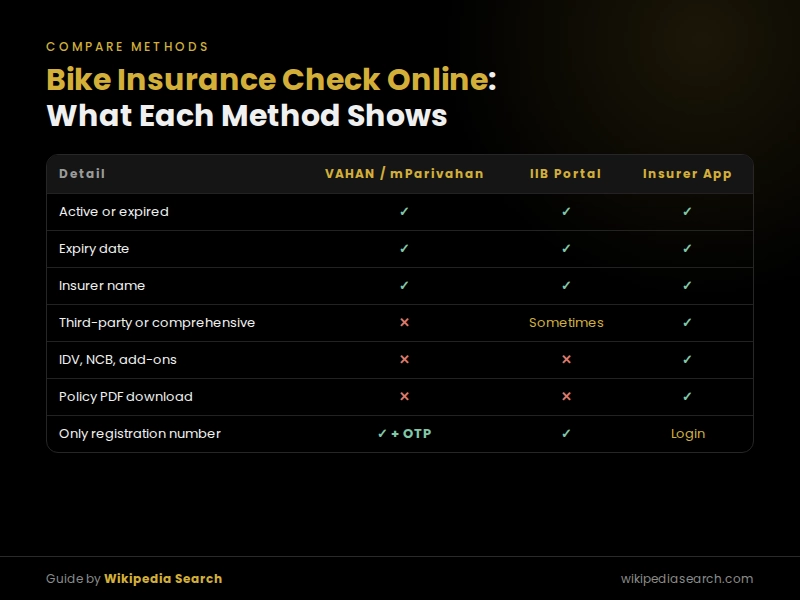
| Detail | VAHAN / mParivahan | IIB | Insurer app |
| Active or expired | Yes | Yes | Yes |
| Expiry date | Yes | Yes | Yes |
| Insurer name | Yes | Yes | Yes |
| Policy number | Sometimes | Yes | Yes |
| Third-party or comprehensive | No | Sometimes | Yes |
| IDV, NCB, add-ons | No | No | Yes |
| Policy PDF download | No | No | Yes |
| Needs only registration number | Yes (plus OTP login) | Yes | Usually needs login |
“I Renewed, But VAHAN Still Says Expired”
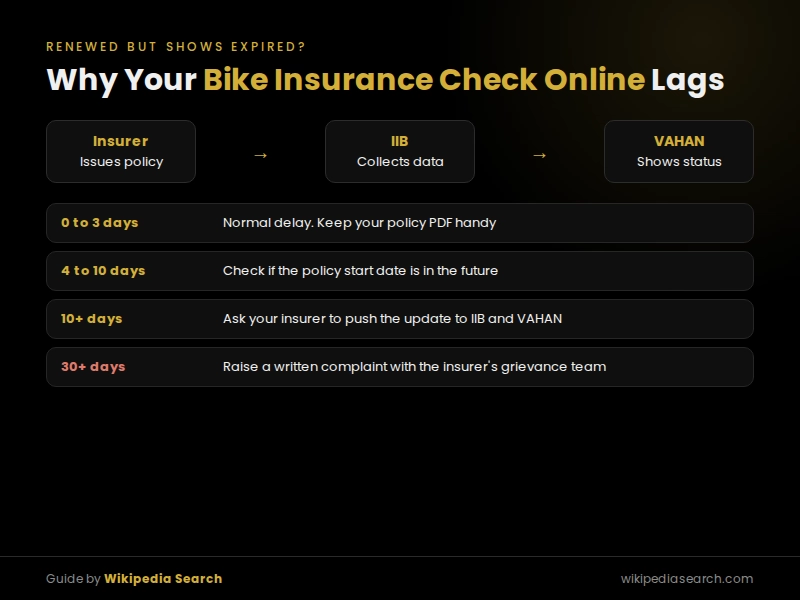
This is the most common panic, and it is usually a timing issue, not a problem with your policy. When you renew, your insurer sends the data to IIB, which then updates VAHAN. That chain takes time.
How long? Sources disagree. Some guides say 24 to 48 hours, others say 3 to 5 days, and Policybazaar has told a customer it can take up to 30 days in some cases. Here is a practical timeline based on those reports:
| Time since renewal | What to do |
| 0 to 3 days | Normal. Carry your new policy PDF or keep it in your insurer’s app |
| 4 to 10 days | Check the policy start date. If it begins in the future, VAHAN updates only from that date |
| More than 10 days | Contact your insurer and ask them to push the update to IIB and VAHAN |
| Still missing after 30 days | Raise a written complaint with your insurer’s grievance team |
Example of the start-date rule: if your old policy runs until 20 October and you renew on 10 October, the new policy starts on 21 October. VAHAN will keep showing the old expiry date until then, and that is correct.
Buying a Second-Hand Bike? Do This 5-Minute Check
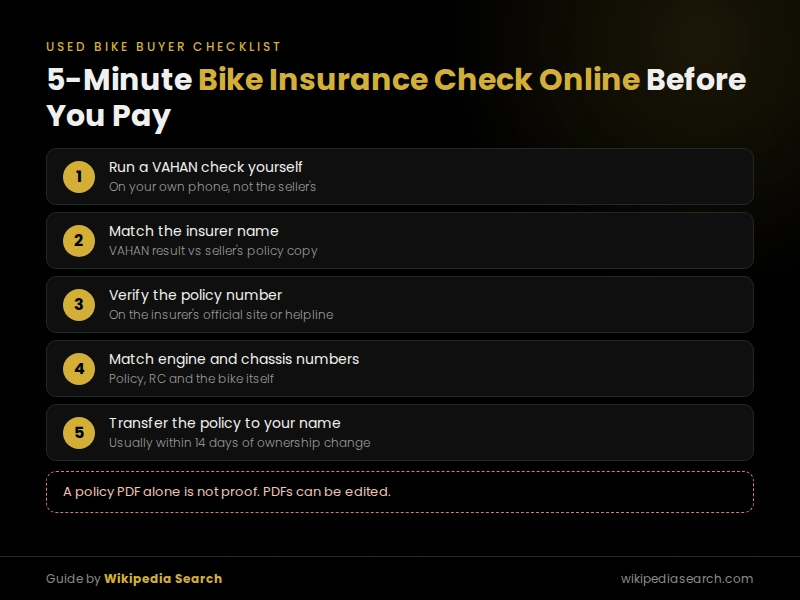
A seller showing you a policy PDF is not proof. PDFs can be edited, and fake motor policies do circulate. Before paying:
- Run a VAHAN check on the registration number yourself, on your own phone.
- Match the insurer name shown on VAHAN with the name on the seller’s policy document.
- Verify the policy number on that insurer’s official website or by calling their toll-free number.
- Match the engine and chassis numbers on the policy, the RC and the bike itself.
- Plan the transfer: after you buy, the policy must be transferred to your name, usually within 14 days of the ownership change, or you may face trouble in a claim.
If VAHAN shows expired insurance, factor the renewal cost into your price, and remember that renewing a lapsed policy may require a bike inspection.
Mistakes and Myths to Avoid
“Check it on the Sarathi portal.” Some articles suggest this. Sarathi is the Parivahan service for driving licences, not vehicle insurance. Use VAHAN instead.
“VAHAN shows everything about my policy.” It does not. It confirms validity, not whether you have comprehensive cover or just third-party.
“Third-party insurance is optional for old bikes.” It is not. Third-party cover is mandatory for every bike on Indian roads under the Motor Vehicles Act, regardless of age.
“Riding a day or two after expiry is fine.” Riding without valid insurance can lead to a fine of ₹2,000, up to three months’ imprisonment, or both for a first offence, with a ₹4,000 fine for repeat offences. More importantly, any accident in that gap is entirely on you.
FAQs
Can I do a bike insurance check online without the policy number?
Yes. VAHAN, mParivahan and IIB all work with just your bike’s registration number. You only need the policy number or registered mobile number to log in to your insurer’s app.
Is bike insurance check online free?
Yes. VAHAN, mParivahan, IIB and DigiLocker are free government services. Insurer apps are also free to use for checking your own policy.
Why does my new bike’s insurance not show online?
New bikes often show insurance only after the RTO allots the permanent registration number and the records sync. Keep your dealer-issued policy copy handy until it appears.
Can I check bike insurance by chassis number?
Some insurer portals and IIB searches accept engine and chassis numbers, which is useful for brand-new bikes without a permanent number. VAHAN searches by registration number.
Bike insurance online kaise check kare?
Parivahan ki VAHAN website ya mParivahan app kholiye, apna bike number daaliye aur OTP se login kariye. Result mein “Insurance Valid Upto” date dikhegi. Poori policy details ke liye apni insurance company ka app use kariye.
Insurance renew kiya par VAHAN par expired dikh raha hai, kya karein?
Ghabraiye nahi. Renewal ke baad VAHAN update hone mein aksar 1 se 3 din lagte hain. Agar 10 din baad bhi update na ho, toh apni insurance company se baat kariye aur tab tak policy ki PDF apne paas rakhiye.
Check Once, Then Set a Reminder
You now know which free tool to use for your situation, why a fresh renewal can look expired, and how to protect yourself when buying a used bike. Do your check today, then set a phone reminder 15 days before your expiry date so you never ride uninsured by accident.
For more simple, no-sales guides on money, vehicles and everyday paperwork, explore Wikipedia Search. If someone in your family rides daily, share this page so they can check their bike too.
What’s New in This Update
Latest update:
- Added a situation-based guide and a side-by-side table of what VAHAN, IIB and insurer apps show
- Added a sync-delay timeline after comparing conflicting update times reported online
- Added a 5-minute used-bike verification checklist and corrected the common Sarathi myth
We review this guide regularly and update it whenever official portals, rules or penalties change.
Disclaimer
Wikipedia Search is an independent information website and is not affiliated with any insurance company, aggregator, IRDAI, IIB or the Ministry of Road Transport and Highways. Portal steps, fines and rules can change. Always confirm your policy details with your insurer and refer to official government sources for legal requirements.
About the Author
Govind Kumar writes practical vehicle and personal finance guides for Wikipedia Search. He compares official government portals with what insurers and aggregators publish, so readers get neutral answers without sales pressure.